In a Hurry? Key Takeaways
Onboarding sets the operational cadence for video editing retainers. Standardize your 72-hour agency intake: automate brand asset collection, lock creative briefs, establish cloud storage structures, and confirm turnaround SLAs.
Executed service agreement and cleared upfront deposit receipt
Brand asset vault containing vector logos, fonts, color HEX codes, and motion guidelines
Three benchmark reference videos annotated with preferred editing treatments
Standardized cloud directory structure with validated client access permissions
Scale Your Video Editing Agency With Zero Chaos
Manage freelance editors, streamline revisions, protect clients with two-lane masked messaging, and retain 100% of your earnings. No hidden fees, no marketplace middleman cuts.
Hours 0 to 24: Secure deposit billing, contractual signatures, and communication channels
The initial twenty-four hours determine whether a video client treats your agency as an elite production partner or an ad-hoc vendor. Immediately upon verbal commitment, dispatch your digital contract alongside the first month's pre-funded retainer invoice or milestone deposit. Timeline commitments should remain dormant until payment confirmation is recorded.
Establish the primary communication lane before project kickoff. Avoid fragmented email threads and informal personal chat groups. Instead, invite client stakeholders into a dedicated workspace channel with a pinned welcome document outlining agency office hours, revision submission protocols, and emergency escalation routes.
- Collect signed subcontract terms and 50% upfront milestone deposit before scheduling editors.
- Configure a dedicated agency communication channel with pinned operational rules.
- Provide clients with a 3-minute video overview explaining review milestone handoffs.
Hours 24 to 48: Ingest brand identity kits, motion presets, and creative benchmarks
Production bottlenecks usually originate from missing typography, outdated logo vectors, or conflicting style expectations. During the second twenty-four-hour window, guide the client through a structured creative intake portal. Collect vector logo assets, corporate brand font licenses, motion graphics presets, and LUT color grading references.
Require the client to submit three benchmark video links representing their target visual aesthetic, pacing, and sound design. Pairing each benchmark link with notes detailing specific elements to replicate prevents subjective misalignment during the rough cut assembly phase.
- Audit client brand assets: vector SVG/AI logos, brand palettes, and licensed typography files.
- Collect 3 approved reference videos highlighting ideal pacing, B-roll density, and caption styles.
- Confirm target deliverable aspect ratios: 9:16 vertical, 16:9 widescreen, and 1:1 square crops.
Hours 48 to 72: Deploy cloud directory templates and validate first cut turnaround SLAs
The final twenty-four hours transition onboarding into active production. Initialize an organized cloud storage architecture using standardized directory naming conventions (Raw_Footage, Assets, Project_Files, Exports, Feedback). Test raw video upload speeds and ensure client team members possess edit access permissions.
Conclude the 72-hour sequence with an alignment kickoff briefing. Reiterate turnaround service level agreements: forty-eight hours for vertical reels, seventy-two hours for long-form explainers, and twenty-four hours for minor revision rounds. Locking this cadence prevents premature delivery anxiety while editors assemble the initial cut.
- Deploy a standardized cloud directory hierarchy for raw footage, assets, and project files.
- Verify permissions and bandwidth throughput on client raw footage upload shares.
- Confirm revision SLAs: 48 hours for initial draft, 24 hours for revision turnaround.
What To Check Before You Decide
- Executed service agreement and cleared upfront deposit receipt
- Brand asset vault containing vector logos, fonts, color HEX codes, and motion guidelines
- Three benchmark reference videos annotated with preferred editing treatments
- Standardized cloud directory structure with validated client access permissions
- Confirmed turnaround SLA calendar defining delivery schedules and revision windows
Comparison Table
| Option | Best for | Tradeoff | Gigxomi angle |
|---|---|---|---|
| Scattered chat onboarding | Informal one-off quick edits | Constant asset loss, missed deadlines, and creeping expectations | Centralize intake into a repeatable 72-hour post-production protocol. |
| Lengthy 20-page questionnaire | Enterprise documentary productions | High client churn and onboarding friction before first video delivery | Use a concise 72-hour intake sequence focused only on critical production assets. |
| Gigxomi Structured Onboarding | High-volume agency retainers and short-form video editors | Requires strict initial asset gatekeeping | Combine rapid asset intake with Two-Lane masked chat to maintain client accountability. |
Action Steps for video editing client onboarding checklist
- Automate contract execution and upfront retainer deposit collection upon deal closing.
- Send the standardized digital creative intake form requesting brand kits, fonts, and references.
- Deploy the pre-configured agency cloud folder structure for footage and project assets.
- Schedule a 15-minute onboarding sync to review communication etiquette and revision boundaries.
- Route day-to-day video reviews through a structured workspace channel with milestone gates.
The Video Editing Agency Delivery Engine
How modern studios scale client capacity without founder micro-management or poaching risk:
Omnichannel Inbound
WhatsApp & Instagram DM leads arrive in Unified Inbox
Qualification & Quote
Manager scores scope, prices deal & sends quote link
Two-Lane Masked Chat
Editor receives brief; client phone is 100% encrypted
Review & Approval
Client approves rough cut with gated revision limits
0% Commission Payout
Agency keeps 100% of fees; auto-renewal locked
Anti-Poaching Guarantee: Editors never see raw client phone numbers or direct payment links. All communication is relayed via encrypted tokens, protecting your agency's client equity permanently.
Put the Process Into Practice
Gigxomi helps video-editing agencies and studio owners keep client context, manager delegation, editor assignments, reviews, delivery, and payout visibility connected. Use this guide to structure your process; use the workspace when that process requires shared ownership and a reliable operating record.
You can also read our in-depth video editing agency management software guide, or review agency workspace pricing.
Continue Your Plan
Scale on Gigxomi Agency Workspace
Keep onboarding frictionless and client accounts secure with Two-Lane masked chat (anti-poaching shield), take home 100% of your retainer revenue with 0% platform commission, and connect with our WhatsApp concierge (+91 99933 28124) for live workspace setup.
Frequently Asked Questions
What is the single biggest cause of delayed video editing onboarding?
Delayed client asset delivery—specifically unorganized raw footage and missing brand fonts—causes over seventy percent of post-production delays. Enforcing a hard 48-hour asset submission deadline keeps production on schedule.
How should agencies manage client communication during onboarding?
Agencies should restrict onboarding communication to an official workspace portal or centralized communication channel. Avoid personal phone numbers to prevent after-hours message creep and ensure that multiple editors can review client instructions.
Why is collecting reference videos essential before editing starts?
Subjective descriptions like 'make it punchy' mean different things to different clients. Benchmark reference links establish an objective standard for hook pacing, text animation density, and sound effects before timeline assembly begins.
Related Guides
Explore more agency scaling blueprints, client acquisition systems, and software comparisons.
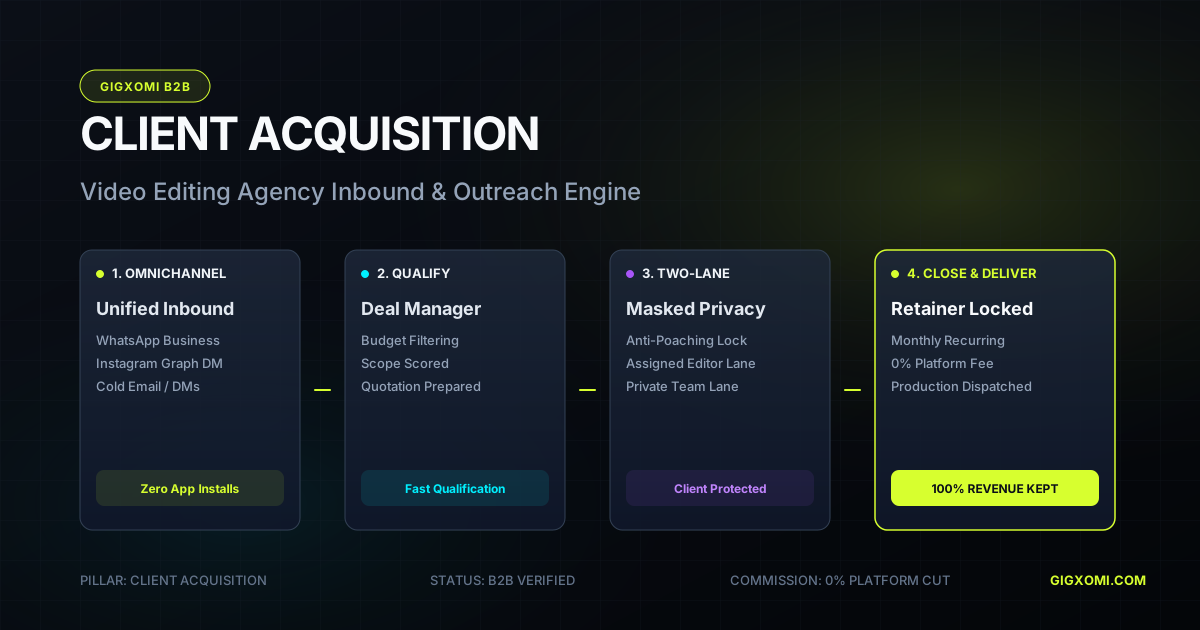
How to Get Video Editing Clients: A Repeatable System
Build a repeatable client pipeline by choosing a niche, creating relevant proof, finding businesses with visible video demand, and following up with a specific offer.
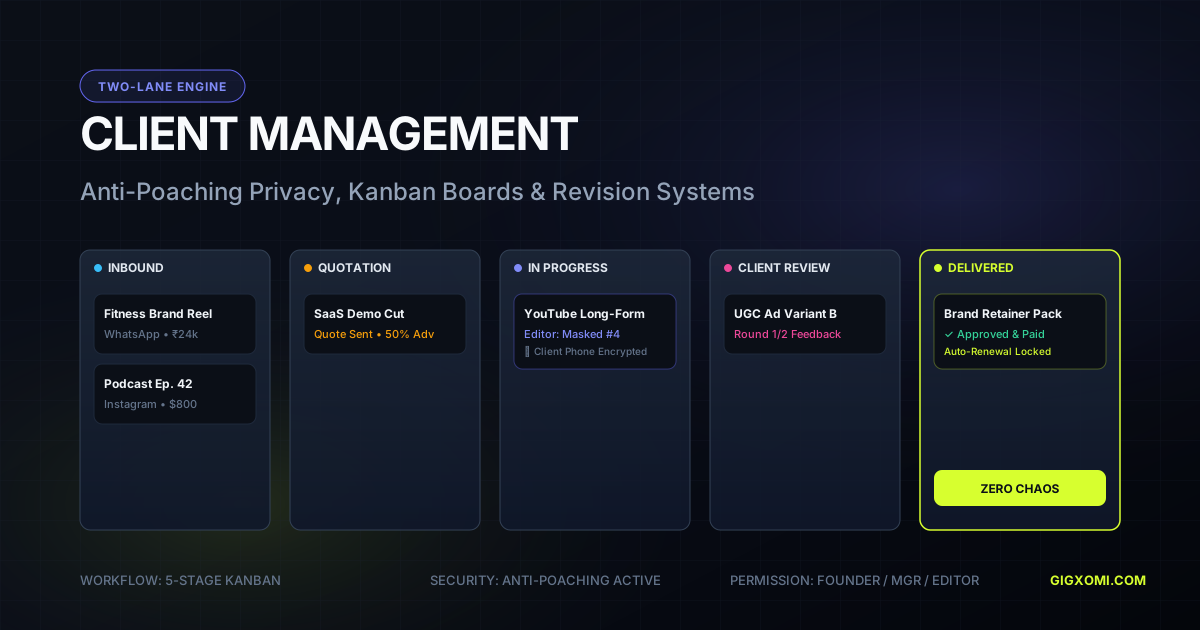
How to Manage Video Editing Clients Without Chaos
Manage editing clients with a visible lifecycle: qualification, scoped onboarding, asset intake, milestones, consolidated review, approval, delivery, payment, and retention.
Build a Video Editing Client Acquisition Funnel
A practical editing funnel moves a qualified prospect through one clear decision at a time: relevant message, useful conversation, scoped paid pilot, reliable delivery, and a justified recurring offer.
CRM for Video Editors: What to Track and Why
A useful CRM for video editors tracks relationships and revenue decisions—not just contacts—including source, fit, offer, next action, proposal, project history, and retention opportunity.
Video Editing Turnaround Times: A Realistic Planning Guide
A reliable deadline begins with footage volume, edit complexity, review ownership, revision limits, and delivery format—not with a universal number of days.
How to Get Your First Video Editing Client
Get the first paid client by narrowing your offer, producing one relevant proof piece, contacting warm and well-researched prospects, and selling a small paid pilot.
How to Get Video Editing Clients as a Beginner
A beginner can compete through focus, reliable fundamentals, honest samples, fast communication, and a paid pilot that is small enough to deliver exceptionally well.
How to Get Video Editing Clients in India
Find Indian clients through niche communities, local business networks, creator ecosystems, production partners, and outreach that reflects regional language and payment realities.